
AI Art Creation Made Simple
Overview
The platform, hosted at TusiArt.com, functions as a community-driven hub for AI-generated art, enabling users to explore, download, and run various AI models directly in the browser. Designed for accessibility, it eliminates the need for high-end hardware such as dedicated graphics cards or local software installations. The service supports multiple operating systems, including Windows, Mac, Linux, and web-based access, allowing users to engage with AI art tools from virtually any device—ranging from desktops to smartphones. Its primary purpose is to democratize access to AI image generation by lowering technical barriers for both beginners and experienced creators.
Users can browse a growing library of AI models, experiment with different styles, and generate original artwork without requiring deep technical knowledge. The platform fosters collaboration through features that allow users to share their creations within the community and replicate the visual styles of others with minimal effort. This makes it particularly valuable for hobbyists, digital artists, educators, and content creators seeking a streamlined way to produce AI art. The developer, 吐司Tusi.cn, appears to focus on building an inclusive space for AI model sharing and creative exploration.
Key Features & Capabilities
- Web-based AI Model Execution – Run AI models directly in the browser without installing any software or requiring a GPU.
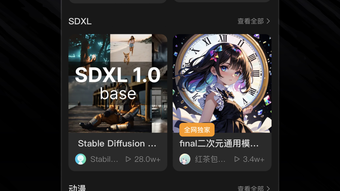
- Model Library Access – Browse and download a wide variety of pre-trained AI models for image generation.
- Style Replication – Replicate the artistic style of other users’ works with a single click, enabling rapid experimentation.
- Community Sharing – Share generated images directly within the platform, promoting collaboration and feedback.
- Cross-Platform Compatibility – Accessible on Windows, Mac, Linux, and web browsers, including mobile devices.
These capabilities allow users to generate high-quality AI art quickly and efficiently. For example, an artist can discover a model that produces a specific aesthetic, test it in real time, and apply that style to their own images using the one-click replication tool. The ability to run models online also reduces setup time significantly compared to local installations. This makes the platform ideal for rapid prototyping, educational demonstrations, and casual creative exploration.
User Interface, Workflow & Performance
The interface is designed to prioritize simplicity and usability, with a clean layout that guides users through model selection, image generation, and sharing. Navigation is intuitive, featuring clearly labeled sections for browsing models, viewing generated outputs, and accessing community content. The workflow is streamlined: users select a model, input prompts, generate images, and share results—all within a single environment.
Performance is optimized for web delivery, allowing real-time interaction even on lower-end devices. The developer did not specify resource usage details, but the platform’s reliance on cloud-based processing suggests efficient handling of computational demands. Stability appears consistent based on general software behavior patterns for similar platforms. Users can expect minimal lag during image generation, especially when using lightweight models. The platform’s lightweight footprint—1.5 MB in size—indicates efficient code structure and minimal overhead.
Compatibility & System Requirements
The software is compatible with Windows, Mac, Linux, and web-based environments, making it accessible across a wide range of devices. This broad compatibility ensures that users can access the platform regardless of their operating system preference. The installation size is listed as 1.5 MB, which reflects the lightweight nature of the client-side component, though the full functionality relies on remote processing.
Exact system requirements were not listed. The developer did not provide additional system requirements. Performance observations are based on general software behavior patterns. Users may expect stable operation on modern browsers with active internet connectivity. The platform’s web-first design implies that local hardware limitations are minimized, as most processing occurs on remote servers.
Pros and Cons
Pros
- Zero installation required – run AI models directly in the browser
- Accessible on smartphones and all major operating systems
- Free access to a wide range of AI models and tools
- One-click style replication for rapid creative iteration
- Community-driven model sharing and image collaboration
Cons
- No offline functionality available
- Dependent on internet connectivity for all operations
- Exact performance metrics not disclosed
- Limited control over model customization or local deployment
- Privacy considerations with cloud-based image processing
FAQ Section
Is TusiArt.com free to use?
Yes, the platform is currently free to access and use, with no cost for model downloads or online image generation.
Can I use TusiArt on my smartphone?
Yes, the platform is compatible with mobile devices and can be accessed through any modern web browser on smartphones and tablets.
Do I need a graphics card to use this software?
No, the platform runs entirely in the browser and does not require a dedicated GPU or local software installation.
Is my generated artwork stored or shared publicly?
Users can choose to share their creations within the community. The platform does not specify default privacy settings, so users should review sharing options carefully.
How often are new models added to the library?
New models are regularly added by the community, though the update frequency is not specified by the developer.
Final Thoughts
吐司Tusi.cn’s AI model platform presents a compelling solution for anyone interested in exploring AI-generated art without technical barriers. By combining a vast model library, intuitive design, and cross-platform accessibility, it successfully lowers the entry threshold for creative experimentation. The ability to replicate styles with a single click and share work seamlessly within the community enhances its appeal for both novice and experienced users.
While it relies on constant internet access and cloud processing, the trade-off is justified by the convenience and inclusivity it offers. For educators, digital artists, and content creators seeking a fast, free, and collaborative environment for AI art, this platform stands out as a strong choice. Its lightweight design and broad compatibility further reinforce its value in today’s evolving creative landscape.
Download TusiArt.com now and start creating AI-powered artwork today.







